
Broms and Brinch Hansen lateral capacity for single piles, with layered soil profiles, groundwater and print-ready reports. Nothing to install — it runs entirely in your browser and is free with a KeoGeo sign-in.
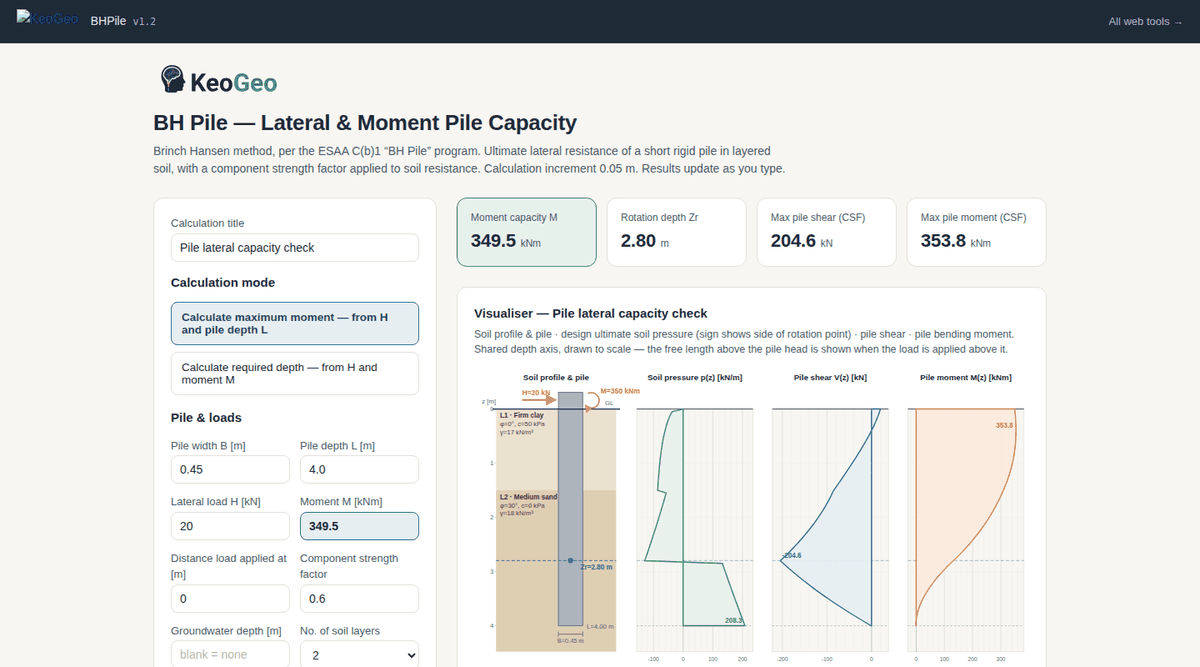
One screen: inputs on the left, the pile and soil profile drawn live in the middle, results on the right.
BHPile analyses the ultimate lateral capacity of a single pile using the classic Broms method and the Brinch Hansen (ESAA C(b)1) formulation, side by side:
Need to run many cases? KeoGeo Pro adds a CSV batch processor to this tool — A$20/month, cancel any time.
Ultimate lateral resistance Hu for both Broms and Brinch Hansen, with the governing failure mode (short or long pile) identified.
Soil pressure distribution with depth, point of rotation, and maximum bending moment location — drawn to scale for your inputs.
A print-ready calculation report with inputs, method references, intermediate values and results — ready for a design appendix.
Use an account you already have. Your first sign-in creates your KeoGeo account automatically.
Card details are handled by Stripe and never touch KeoGeo.