Web Tools · QGIS Agent Flow

QGIS Agent Flow — An AI Assistant That Works Inside Your Open QGIS Project.

Type what you want in plain language — “buffer the roads layer by 50 m”, “fix the invalid geometries”, “what CRS is this project in?” — and the agent inspects your live project, proposes one action at a time, runs it in QGIS after you approve it, sees the result and keeps going until the task is done. Works with free local models (Ollama), free cloud models through Ollama, or your own Claude, Gemini, OpenRouter or Groq key. Download free with a KeoGeo sign-in.

v1.8.1 · download and run locally · A$50 one-off, lifetime re-downloads and updates
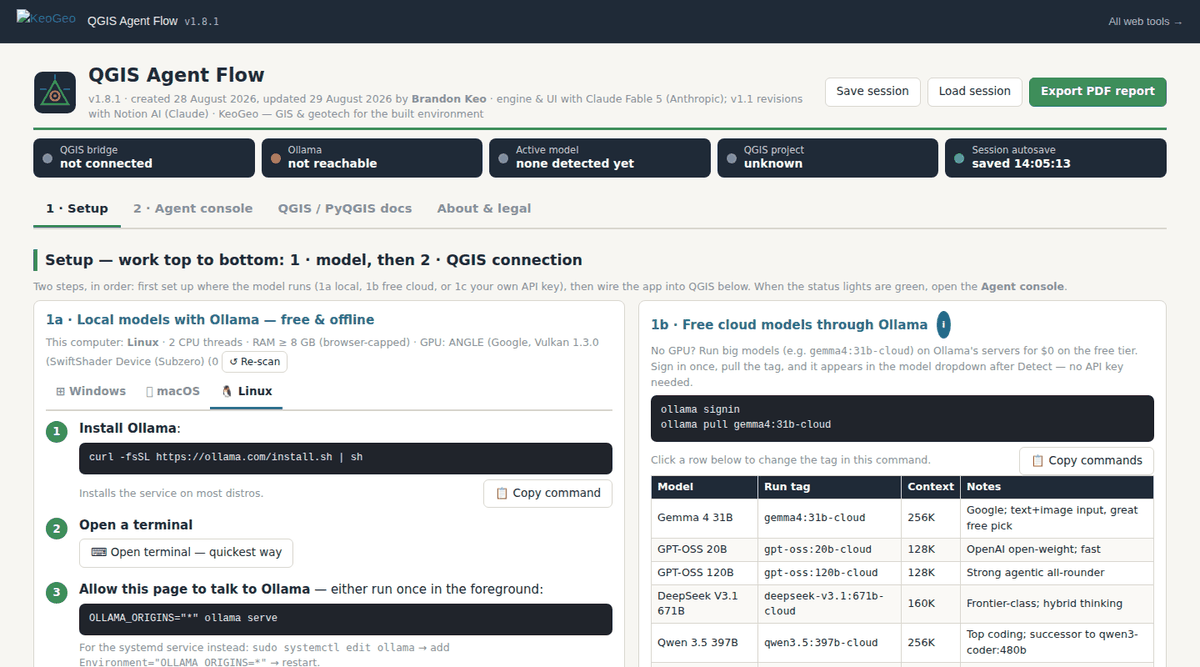
QGIS Agent Flow web app — Setup works top to bottom — pick a model (local Ollama, cloud, or an API key), then connect QGIS with a one-download bridge — and the agent console, action history and playbooks follow.

Setup works top to bottom — pick a model (local Ollama, cloud, or an API key), then connect QGIS with a one-download bridge — and the agent console, action history and playbooks follow.

What It Does

Plan, Act, Check, Repeat — With A Human Approving Each Step.

Agent Flow is a single offline HTML file that talks to a small Python bridge running inside QGIS. Everything the agent does is visible, undoable where QGIS allows, and exportable as a script:

  • Model choice — local models with Ollama (nothing leaves your machine), free cloud models through Ollama's $0 tier, or frontier models with your own API key. Detect installed models, test one before committing, and see Ollama's VRAM allocation.
  • Plan-then-act — pinned goals, one proposed action at a time, streaming with live thinking, loop and stall recovery.
  • Layer preflight — automatic CRS, units and validity checks on the layers involved before an action runs.
  • Live documentation tools — algorithm_help, pyqgis_help, web search (DuckDuckGo with Bing fallback) and fetch_url so the agent reads the real docs rather than guessing algorithm IDs.
  • Playbooks — workflow recipes aligned to the QGIS Training Manual, plus your own saved playbooks the agent retrieves for matching tasks.
  • Batch runs — one task across many QGIS project files, unattended, each opened, processed and saved in turn.
  • Audit and export — action history with best-effort undo, SHA-256-checksummed audit reports, and session → PyQGIS script export so a run becomes a reusable script.
  • One-download bridge — a Windows .bat or a one-line macOS/Linux command installs a bridge that starts with every QGIS launch and connects within seconds; manual console paste remains as a fallback. File upload to the QGIS machine goes through the same bridge.

A$50 one-off · tied to your KeoGeo account · re-download any time, new versions included · 14-day refund if it doesn't work for you · KeoGeo Pro subscribers can spend their one-time A$50 credit on this tool

Example Outputs

What You Get Out Of It.

Agent Console

A conversation with the agent: plan, proposed action, approval, result — streamed, with the QGIS project state alongside.

Action History And Undo

Every action run in QGIS, newest first, with undo where QGIS supports it.

Audit Report

A checksummed record of the session's actions and results for review or QA.

PyQGIS Script

The session exported as a standalone PyQGIS script you can rerun without the agent.

Method & References

What The Numbers Are Based On.

Every calculation in QGIS Agent Flow is tied to a published source, and the in-app Sources & References section repeats this list next to the calculations themselves:

  • PyQGIS Developer Cookbook and API reference (docs.qgis.org, qgis.org/pyqgis) — patterns, algorithm IDs, console behaviour.
  • QGIS Training Manual (docs.qgis.org) — the workflow sequencing behind the playbooks (modules 2, 5–8 and 18).
  • Ollama documentation — REST API (/api/chat, /api/tags, /api/ps), CORS via OLLAMA_ORIGINS, cloud models, keep_alive and options; Anthropic Messages API, Google Gemini generateContent, OpenRouter/Groq OpenAI-compatible chat completions.
  • Bridge pattern — Python http.server ThreadingHTTPServer with QTimer polling on the Qt main thread, loopback only.
Limitations

Where It Stops, And What You Still Have To Check.

  • The agent can run real code in your QGIS project — and by default it does so without asking for up to 100 automatic steps. Save and back up your project first, watch the action history, and tick “Ask before every action” for anything risky.
  • Undo is best-effort: QGIS edits are not transactional and some actions (for example deleting a file on disk) cannot be reversed.
  • A browser page cannot launch a terminal or read whole-system CPU/RAM; resource figures are Ollama's own allocation report, RAM detection is capped at 8 GB by browsers, and the GPU name comes from WebGL and may be generic.
  • Because it talks to a bridge on localhost, Agent Flow runs as a downloaded file rather than inside the keogeo.io page.

All KeoGeo tools are provided for preliminary assessment and educational purposes. Results must be verified by a suitably qualified engineer before use in design or construction; the full disclaimer is inside the app and in our terms.